
How to Set Up an AWS Organization Trail
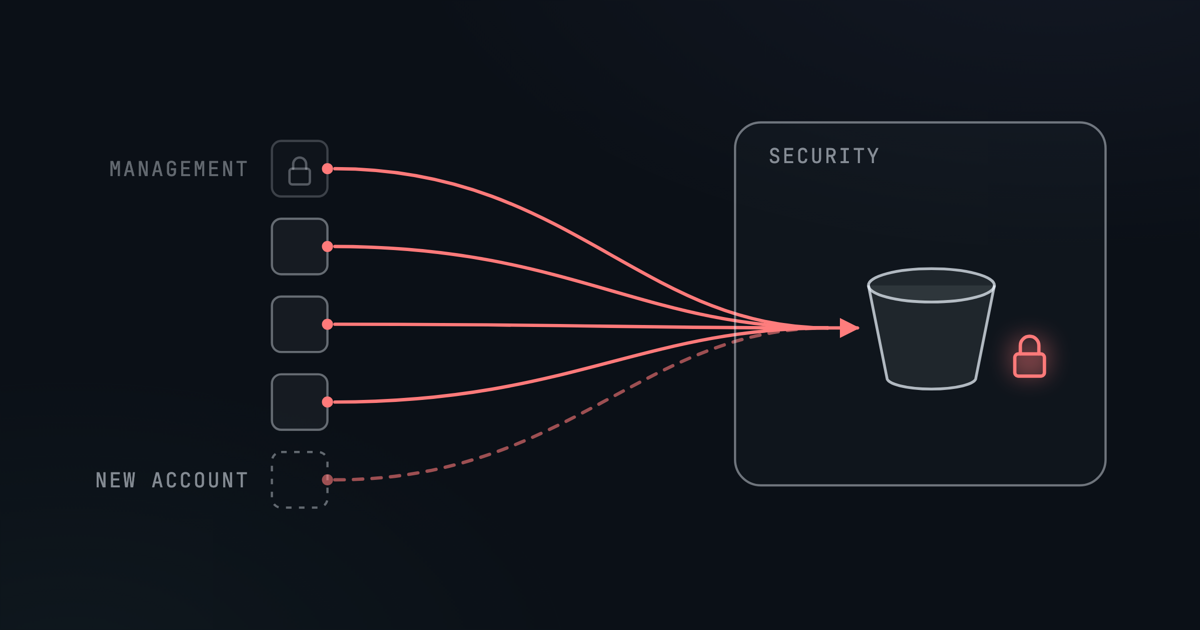
One Trail For Every Account
Most AWS organizations start with a CloudTrail trail in each account, set up by hand when the account was created. Over time they drift. One logs only its own Region, another never turned on log file validation, and the account someone created last month has no trail at all. Anyone with admin rights in an account can also switch its trail off.
An organization trail replaces all of them with one. It is created in every account in the organization, including accounts that join later, and logs them all to one bucket. Member accounts can see it, but they cannot turn it off, change what it logs or delete it.
This post sets one up the way we would, and says why at each step rather than listing every option. In short: run it from a locked-down security account, keep the management account out of it, store the logs where nobody can delete them early, and, if you want to search them, query them with Athena. Prices are rounded from AWS's list prices in October 2026, so check the CloudTrail pricing page before you plan around them.
If you use AWS Control Tower, check first: its landing zone creates an organization trail by default. You don't need a second one.
AWS Account Setup
The setup uses two accounts.
The management account owns the organization. You use it for a short setup at the start, and nothing else. It can do anything in the organization, and no guardrail applies to it, so the fewer people who sign in there, and the less often, the better.
The security account becomes CloudTrail's delegated administrator. It holds the trail's settings, the bucket the logs land in, and Athena if you use it. Because it holds the record of everything that happens in your organization, lock it down to administrators only:
- Sign-in only through IAM Identity Center, for a small group of named administrators, with MFA required.
- No IAM users and no long-lived access keys.
- Nothing else runs there: no applications, no CI/CD pipelines, no deployment roles.
- No root user sign-ins. IAM's centralized root access, switched on from the management account, lets you remove the root user's credentials altogether. Otherwise, protect the root user with MFA and never use it.
Before You Start
- All features must be enabled in AWS Organizations, not just consolidated billing. In the management account, this should print
ALL:aws organizations describe-organization \ --query Organization.FeatureSet - Pick a home Region for the trail: ideally the one where you already run organization-wide services such as IAM Identity Center, so they all live in one place. Avoid an opt-in Region, though: if the home Region is opt-in, accounts that haven't enabled it send nothing to the trail. Create the bucket, and the Athena table if you add one, in the same Region.
The commands use these placeholders. Replace each one, angle brackets included, with your own value:
<MANAGEMENT_ACCOUNT_ID> | The management account's ID |
<SECURITY_ACCOUNT_ID> | The security account's ID |
<MEMBER_ACCOUNT_ID> | The ID of any other member account |
<ORG_ID> | The organization ID, which starts with o- |
<HOME_REGION> | The home Region, such as us-east-1 |
We suggest naming the log bucket org-trail-logs-<SECURITY_ACCOUNT_ID>, as the commands do. Bucket names are shared across all of AWS, and the account ID makes a clash unlikely.
Step 1: Hand CloudTrail To The Security Account
Sign in to the management account. Allow CloudTrail to work across the organization, then make the security account its delegated administrator:
aws organizations enable-aws-service-access \
  --service-principal cloudtrail.amazonaws.com

aws cloudtrail register-organization-delegated-admin \
  --member-account-id <SECURITY_ACCOUNT_ID>
If you'd rather stay in the browser, run both in AWS CloudShell. Don't switch on trusted access from the AWS Organizations console instead: AWS asks that it be enabled through the service itself, so the service can set up what it needs. The second command also has a page in the CloudTrail console, under Settings, Organization delegated administrators, Register administrator.
Then sign out of the management account. Everything from here on happens in the security account.
Step 2: Create The Bucket
Create the bucket with S3 Object Lock in compliance mode, with a default retention of one year. In compliance mode nobody can delete or overwrite a log file until it is a year old: not your administrators, not the root user, and not an attacker who gets into the account. That is what makes it safe to keep the logs next to the people who administer the trail.
The trade-off is that the retention can't be shortened, and the only way to remove a locked log early is to close the whole account. Whatever lands in this bucket stays for a year, so use it for this trail only, and keep high-volume data events out of it (more on those below).
In the S3 console, turn on Object Lock under Advanced settings when you create the bucket, which turns on versioning with it. Then set the default retention under the bucket's Properties tab: Compliance mode, 365 days. New buckets already block public access and have ACLs disabled; leave both as they are. From the CLI:
aws s3api create-bucket --bucket org-trail-logs-<SECURITY_ACCOUNT_ID> \
  --object-lock-enabled-for-bucket --region <HOME_REGION>

aws s3api put-object-lock-configuration \
  --bucket org-trail-logs-<SECURITY_ACCOUNT_ID> \
  --object-lock-configuration '{
  "ObjectLockEnabled": "Enabled",
  "Rule": { "DefaultRetention": { "Mode": "COMPLIANCE", "Days": 365 } }
}'
The bucket policy lets CloudTrail write the organization's logs, and only for this trail. Note that the trail ARN in it uses the management account's ID: an organization trail always belongs to the management account, even when the security account creates it.
aws s3api put-bucket-policy \
  --bucket org-trail-logs-<SECURITY_ACCOUNT_ID> \
  --policy '{
  "Version": "2012-10-17",
  "Statement": [
    {
      "Sid": "AWSCloudTrailAclCheck",
      "Effect": "Allow",
      "Principal": { "Service": "cloudtrail.amazonaws.com" },
      "Action": "s3:GetBucketAcl",
      "Resource": "arn:aws:s3:::org-trail-logs-<SECURITY_ACCOUNT_ID>",
      "Condition": {
        "StringEquals": {
          "aws:SourceArn": "arn:aws:cloudtrail:<HOME_REGION>:<MANAGEMENT_ACCOUNT_ID>:trail/org-trail"
        }
      }
    },
    {
      "Sid": "AWSCloudTrailWrite",
      "Effect": "Allow",
      "Principal": { "Service": "cloudtrail.amazonaws.com" },
      "Action": "s3:PutObject",
      "Resource": "arn:aws:s3:::org-trail-logs-<SECURITY_ACCOUNT_ID>/AWSLogs/<MANAGEMENT_ACCOUNT_ID>/*",
      "Condition": {
        "StringEquals": {
          "aws:SourceArn": "arn:aws:cloudtrail:<HOME_REGION>:<MANAGEMENT_ACCOUNT_ID>:trail/org-trail"
        }
      }
    },
    {
      "Sid": "AWSCloudTrailOrganizationWrite",
      "Effect": "Allow",
      "Principal": { "Service": "cloudtrail.amazonaws.com" },
      "Action": "s3:PutObject",
      "Resource": "arn:aws:s3:::org-trail-logs-<SECURITY_ACCOUNT_ID>/AWSLogs/<ORG_ID>/*",
      "Condition": {
        "StringEquals": {
          "aws:SourceArn": "arn:aws:cloudtrail:<HOME_REGION>:<MANAGEMENT_ACCOUNT_ID>:trail/org-trail"
        }
      }
    }
  ]
}'
The third statement is the one an organization trail uses. The second covers the trail if it is ever turned back into a single-account trail. The JSON goes straight into the command in single quotes, which works in CloudShell or any macOS or Linux shell. In the console, paste the JSON from between the quotes into the bucket's Permissions tab instead.
Finally, a lifecycle rule to clear the logs once their year is up. Object Lock stops it from removing anything sooner. Don't bother moving logs to cheaper storage classes on the way: CloudTrail's files are small, and S3 no longer moves objects under 128 KB by default, because the per-object fee costs more than the saving.
aws s3api put-bucket-lifecycle-configuration \
  --bucket org-trail-logs-<SECURITY_ACCOUNT_ID> \
  --lifecycle-configuration '{
  "Rules": [
    {
      "ID": "expire-after-a-year",
      "Status": "Enabled",
      "Filter": {},
      "Expiration": { "Days": 365 },
      "NoncurrentVersionExpiration": { "NoncurrentDays": 1 }
    }
  ]
}'
Step 3: Create The Trail
Still in the security account, open the CloudTrail console in the home Region:
- Choose Trails, then Create trail.
- Name it
org-trail. A trail can't be renamed later. - Tick Enable for all accounts in my organization. If you don't see it, you are not signed in to the delegated administrator.
- For Storage location, choose Use existing S3 bucket and enter
org-trail-logs-<SECURITY_ACCOUNT_ID>. - Turn Log file SSE-KMS encryption off. It is on by default, and S3 encrypts the logs anyway (see below for why we skip the key).
- Under Additional settings, enable Log file validation. CloudTrail then writes a signed digest every hour, so you can prove later that no log was altered or removed.
- On the next page, log Management events with both Read and Write API activity. Leave data events, Insights and network activity events off.
- Review, and choose Create trail.
From the CLI, the same trail is two commands. create-trail on its own makes a single-Region trail without log file validation, which is why every flag here matters, and it doesn't start logging, which is what the second command does. The second command names the trail by its ARN, with the management account's ID:
aws cloudtrail create-trail --name org-trail \
  --s3-bucket-name org-trail-logs-<SECURITY_ACCOUNT_ID> \
  --is-organization-trail \
  --is-multi-region-trail \
  --enable-log-file-validation \
  --region <HOME_REGION>

aws cloudtrail start-logging \
  --name arn:aws:cloudtrail:<HOME_REGION>:<MANAGEMENT_ACCOUNT_ID>:trail/org-trail \
  --region <HOME_REGION>
A new trail logs read and write management events by default, so nothing more is needed.
Step 4: Check It Works
The first logs arrive within about five minutes, though it can take up to 24 hours for the trail to reach every Region of every member account. Check the trail is logging and delivering without errors:
aws cloudtrail get-trail-status \
  --name arn:aws:cloudtrail:<HOME_REGION>:<MANAGEMENT_ACCOUNT_ID>:trail/org-trail \
  --region <HOME_REGION> \
  --query '{Logging:IsLogging,LastDelivery:LatestDeliveryTime,Error:LatestDeliveryError}'
Then look in the bucket. There should be one folder per account under the organization's ID, laid out as AWSLogs/<ORG_ID>/<account>/CloudTrail/<region>/<yyyy>/<mm>/<dd>/:
aws s3 ls s3://org-trail-logs-<SECURITY_ACCOUNT_ID>/AWSLogs/<ORG_ID>/Sign in to a member account and run aws cloudtrail describe-trails. The trail should be listed with "IsOrganizationTrail": true, and an attempt to stop it from there should be refused. That refusal is the point of the whole exercise.
After the first hour, when the first digest has been written, check log file validation works too:
aws cloudtrail validate-logs \
  --trail-arn arn:aws:cloudtrail:<HOME_REGION>:<MANAGEMENT_ACCOUNT_ID>:trail/org-trail \
  --account-id <MEMBER_ACCOUNT_ID> \
  --start-time 2026-10-20T00:00:00Z \
  --region <HOME_REGION>
Step 5: Retire The Old Trails
Leave each account's existing trails running for one day after the organization trail starts, then delete them. That is AWS's own advice: a day of overlap costs a day of duplicate charges and leaves no gap in the record.
Don't keep them "just in case". The first copy of management events in each Region of each account is free, and every copy after that costs $2 per 100,000 events. Once the organization trail is running, an old trail left beside it is the copy you pay for.
If Terraform or CloudFormation created the old trails, delete them there, or the next deploy brings them back. Keep their buckets for as long as you need the history in them: the organization trail does not move old logs.
Step 6 (Optional): Query The Logs With Athena
The trail is complete without this step. But a log you can't search is only useful after the fact, and only to someone patient. Athena queries the logs where they already are, in the bucket you already pay for, at $5 per terabyte of data a query reads. CloudTrail Lake, AWS's managed alternative, closed to new customers on 31 May 2026, so for a new setup Athena is the way to go.
Do all of this in the security account, in the home Region.
A workgroup with no results bucket
Create a workgroup with managed query results, so Athena keeps each query's results itself for 24 hours at no charge, and you need no bucket for them:
aws athena create-work-group --name cloudtrail --region <HOME_REGION> \
  --configuration '{
  "ManagedQueryResultsConfiguration": { "Enabled": true },
  "EnforceWorkGroupConfiguration": true
}'
In the Athena console, it is Workgroups, Create workgroup, with Athena managed as the query result configuration.
A table that needs no upkeep
The table points at the organization's folder in the bucket, so it covers every account, Region and day the trail writes, including accounts that join later, with nothing to update. The trade-off is that every query reads all the logs in the bucket, so a query costs the bucket's size at $5 per terabyte: 20 GB of logs comes to 10 cents a query. The one-year expiry keeps that from growing without end.
In the Athena query editor, with the cloudtrail workgroup selected, create the table. The columns are AWS's own definition of a CloudTrail record:
CREATE EXTERNAL TABLE cloudtrail_logs (
    eventversion STRING,
    useridentity STRUCT<
        type: STRING,
        principalid: STRING,
        arn: STRING,
        accountid: STRING,
        invokedby: STRING,
        accesskeyid: STRING,
        username: STRING,
        onbehalfof: STRUCT<
            userid: STRING,
            identitystorearn: STRING>,
        sessioncontext: STRUCT<
            attributes: STRUCT<
                mfaauthenticated: STRING,
                creationdate: STRING>,
            sessionissuer: STRUCT<
                type: STRING,
                principalid: STRING,
                arn: STRING,
                accountid: STRING,
                username: STRING>,
            ec2roledelivery: STRING,
            webidfederationdata: STRUCT<
                federatedprovider: STRING,
                attributes: MAP<STRING,STRING>>
        >
    >,
    eventtime STRING,
    eventsource STRING,
    eventname STRING,
    awsregion STRING,
    sourceipaddress STRING,
    useragent STRING,
    errorcode STRING,
    errormessage STRING,
    requestparameters STRING,
    responseelements STRING,
    additionaleventdata STRING,
    requestid STRING,
    eventid STRING,
    readonly STRING,
    resources ARRAY<STRUCT<
        arn: STRING,
        accountid: STRING,
        type: STRING>>,
    eventtype STRING,
    apiversion STRING,
    recipientaccountid STRING,
    serviceeventdetails STRING,
    sharedeventid STRING,
    vpcendpointid STRING,
    vpcendpointaccountid STRING,
    eventcategory STRING,
    addendum STRUCT<
        reason: STRING,
        updatedfields: STRING,
        originalrequestid: STRING,
        originaleventid: STRING>,
    sessioncredentialfromconsole STRING,
    edgedevicedetails STRING,
    tlsdetails STRUCT<
        tlsversion: STRING,
        ciphersuite: STRING,
        clientprovidedhostheader: STRING>
)
ROW FORMAT SERDE 'org.apache.hive.hcatalog.data.JsonSerDe'
STORED AS INPUTFORMAT 'com.amazon.emr.cloudtrail.CloudTrailInputFormat'
OUTPUTFORMAT 'org.apache.hadoop.hive.ql.io.HiveIgnoreKeyTextOutputFormat'
LOCATION 's3://org-trail-logs-<SECURITY_ACCOUNT_ID>/AWSLogs/<ORG_ID>/'
The administrators of the security account already have every permission this needs. If you later create a narrower role for investigations, it needs Athena, the Glue Data Catalog and read access to the bucket.
Three queries worth keeping
Each one filters on eventtime to show only the days you are interested in. That narrows the results, not the cost: the query still reads the whole bucket.
Anyone changing CloudTrail itself, including failed attempts, which are worth knowing about too:
SELECT eventtime, recipientaccountid, useridentity.arn, eventname,
       errorcode, sourceipaddress
FROM cloudtrail_logs
WHERE eventtime >= '2026-10-01'
  AND eventsource = 'cloudtrail.amazonaws.com'
  AND eventname IN ('StopLogging', 'DeleteTrail', 'UpdateTrail',
                    'PutEventSelectors')
ORDER BY eventtime DESC
Anything done as a root user, which in a well-run organization should be almost nothing:
SELECT eventtime, recipientaccountid, eventname, sourceipaddress, useragent
FROM cloudtrail_logs
WHERE eventtime >= '2026-10-01'
  AND useridentity.type = 'Root'
  AND useridentity.invokedby IS NULL
ORDER BY eventtime DESC
Console sign-ins by IAM users or root without MFA. Sign-ins through IAM Identity Center are left out on purpose: CloudTrail records MFAUsed as No for every federated sign-in, even when Identity Center asked for MFA, because the field is only set for IAM users and root.
SELECT eventtime, recipientaccountid, useridentity.type, useridentity.arn,
       sourceipaddress
FROM cloudtrail_logs
WHERE eventtime >= '2026-10-01'
  AND eventname = 'ConsoleLogin'
  AND useridentity.type IN ('IAMUser', 'Root')
  AND json_extract_scalar(additionaleventdata, '$.MFAUsed') = 'No'
ORDER BY eventtime DESC
For more queries, ready to paste, see our free Practical Guide to AWS CloudTrail.
What It Costs
| What you pay for | Roughly |
|---|---|
| Management events, first copy in each Region of each account | Free |
| Each further copy of management events | $2 per 100,000 events |
| Athena | $5 per terabyte a query reads |
| S3 | Storing a year of logs, and the requests that write them, at standard rates |
With the old trails gone and data events off, the events themselves cost nothing. You pay for S3 to keep the logs, and for any queries you run.
What We Would Skip
- Data events across the whole organization. One selector for every S3 bucket logs every object read and write in every account, at $0.10 per 100,000 events, and in this bucket each one is kept for a year. When you need data events, add them for named buckets or functions, for a reason.
- Governance mode on the log bucket. In an account of administrators, it stops no one.
- A KMS key for the logs. S3 already encrypts every log file. A key of your own adds a way to destroy them: Object Lock stops anyone deleting a log, but not disabling or deleting the key, and without the key a year of locked logs can't be read.
Where GuardKite Fits
A trail set up well today can still drift tomorrow. GuardKite checks the CloudTrail settings this post relies on, including a multi-Region trail that logs read and write events, log file validation, and a log bucket that isn't public. When one of them changes, it shows up in the next scan.
To see what it finds in your own accounts, book a demo.